iOS Snapchat
Updated: Apr 10
Application | Snapchat [Version 13.85.0] |
Test Device | Apple iPhone 11 |
Operating System | iOS 26.3.1 |
Overview
The testing of this application initially involved the use of an iPhone 11 running iOS 26.3.1 and an iPhone 7 running iOS 15.8.6. After two rounds of testing, a Samsung Galaxy A16 5G (SM-S166V) running Android Version 16 was introduced as well.
I created Snapchat accounts for each device which are as follows:

userIDs for all three test accounts pulled from primary.docobjects
For reference, “dtresearch” is the iPhone 11, “dtlabs” is the iPhone 7, and “droptabletest” is the Samsung Galaxy A16.
The primary focus of the testing surrounded text messages, calls, and sending media. I also wanted to see how information related to the account owner and their “friends” was stored.
After creating some test data, which was documented either by screen recording my entire interactions with the devices or by taking notes, I completed full file system extractions of the iPhone 11 and Samsung Galaxy A16. I did not complete any extractions on the iPhone 7. The extraction for the Samsung was not immediately analyzed as the purpose of my initial research surrounded the iOS application.
After completing the extraction, I extracted the entire Snapchat GUID directory. This folder contains several other subdirectories called “Documents,” “Library,” “StoreKit,” “SystemData,” “tmp,” and a PLIST file named com.apple.mobile_container_manager.metadata.
Findings
The first thing I noticed within the files was the com.snap.file_manager_3_SCContent_[USERID] which is found at [GUID]\Documents\com.snap.file_manager_3_SCContent_[USERID]. Based on my testing, this directory contains all of the cached media sent or received over Snapchat. The files are all in a “FILE” format however and don’t appear to be media files at first glance.

Preview of original media files within com.snap.file_manager
I created a simple python script that will identify the correct file (header when available), copy the file to a directory named "Renamed Media", and rename it with the correct file extension.
Irfanview can also process batches of files and complete a similar process.
There were still some files remaining that were unable to be viewed or a file header was not identified to provide it with the correct file extension. When viewing the files in their hex format, they did not appear to have any identifiable headers.

Based on this and my understanding of Snapchat's functions, I suspect these files are encrypted or obfuscated for some reason.
After running the python script, the renamed files were now "viewable."

Renamed files from com.snap.file_manager_3_SCContent
Arroyo.db
The arroyo.db (Documents\user_scoped\[GUID]\arroyo\arroyo.db) contains a lot of useful information mostly related to conversations and sent/received media. The arroyo.db does contain information about calls as well, but there is a better database for information related to calls that I will address later.
Arroyo.db contains a “conversation” table which identifies different conversations associated with the account user.
Specifically, the conversation table has contains “client_conversation_id,” “conversation_metadata,” and “creation_timestamp.”
client_conversation_id is the unique identifier for each individual chat or group chat. If there is a conversation between two users, that conversation will have a unique identifier. If there is a conversation between those same two users and a third user, that conversation will also have a unique identifier. Any unique conversation will be identified this way.
conversation_metadata contains protobuf data that includes the conversation ID, all of the account user IDs in the conversation, the chat name (if there is one), and the conversation creation timestamp. Really the best piece of information this column provides is identifying what users were associated with the conversation. When viewing this data in DB Browser, a user could likely identify which users were part of a certain conversation if they knew what user_ids they were looking for.

User IDs in conversation_metadata
However the decoded protobuf data makes it much easier to read, especially if the user_ids aren’t immediately known. Outside of python scripting, I typically use the online Protobuf Decoder, to decode this data as it is quick and seems to do a good job.
When this data is decoded, it looks like this:


The conversation_message table has the bulk of the important information in this database. This table contains the following important columns:
client_conversation_id - same as in the conversation table
server_message_id – server message ID number
message_content – identifies the content sent/received
creation_timestamp – epoch timestamp for the time the snap was sent
read_timestamp – epoch timestamp for the time the snap was read
local_message_references – identifies sent Snap media (will be explained below)
created_on device – identifies if the snap was created on the device the data is pulled from
sender_id – userID of the sender


conversation_message table (timestamps converted to UTC)
The client_conversation_id is self explanatory and the server_message_id will be relevant in a later part of this report. Moving on to the message_content, this is exactly what it sounds like. This column again contains protobuf data which can be decoded, but is also fairly easy to read in programs like DB Browser if it is just a text message.

If decoded, some of the data is redundant as it is also identical to columns already in the conversation_message table.


The way that Snapchat handles sent media and received media is different. For sent media, the message will have an associated “local_message_references.” This is easily identifiable by “BLOB” in the column rather than “NULL.”

Sent media snaps ident identified by “BLOB” in local_message_references (timestamps converted to UTC)
This bplist data contains a portion that reads “Media Upload Method Associated Value.” After this, there will be an alphanumeric string beginning with an “I”. The string following the “I” is the EXTERNAL_KEY.

To show the relevance of the EXTERNAL_KEY, we then have to use the cache_controller.db which is found at [GUID]\Documents\global_scoped\cachecontroller\cache_controller.db. This database does exactly what its name implies, it handles the cached data within the file manager.
In this database there is a table called “CACHE_FILE_CLAIM” which carries the bulk of the information necessary to finish manually parsing a sent media message.
The USER_ID column appears to be the user for which the cached file is related. This does NOT mean the user was the one to create the media, just that the cached media is associated with their account. This means if a user sends or receives a media message that is cached, their USER_ID will appear here.
The CACHE_KEY column provides the name of the file as it is stored in the com.snap.file_manager_3_SCContent_[USERID]. This CACHE_KEY will have an associated EXTERNAL_KEY. The EXTERNAL_KEY can then be used to identify the cache_key of the sent media. For the purposes of this report I have limited the data to the same EXTERNAL_KEY used above from row 11 of conversation_message.

The CACHE_KEY can then be searched in the com.snap.file_manager_3_SCContent_[USERID] directory to identify the sent media. That media file renamed with the correct file extension (or opened in a program like IrfanView) can then be viewed.


The CACHE_FILE_CLAIM is also where we can easily identify received media snaps. The received media snaps will have an EXTERNAL_KEY with a format of 1:[client_conversation_id]:[server_message_id]:0:0.” Searching the EXTERNAL_KEY column of the table for “1:” will provide CACHE_KEYs for all of the received media. The below example has been limited to received media snaps so that it is easier to view.

Again, the CACHE_KEY can be searched in the com.snap.file_manager_3_SCContent_[USERID] directory to find the received media.


There are instances where the files associated with the CACHE_FILE_KEY do not exist or appear to be in this encrypted or otherwise obfuscated state and therefore cannot be opened. I believe based on this testing that this is because the files do get deleted from the com.snap.file_manager_3_SCContent_[USERID] directory at some point if they are not saved. The same appears to be true for text messages.
Also within the CACHE_FILE_CLAIM, there are images with EXTERNAL_KEYS in the “customSticker:[alphanumeric string]” format. These are stickers created by the user.

These entries have no “EXPIRATION_TIMESTAMP_MILLIS” presumably because they are set to be saved until deleted by the user. In the above examples, all of the stickers were created by “Remixing” received Snapchats. Snapchat stores the received media and the sticker in the SCContent_[USERID] directory and they each have their own CACHE_KEY and EXTERNAL_KEY.
The original received Snapchat media entry does appear to have an EXPIRATION_TIMESTAMP_MILLIS and eventually is deleted.
Moving back to the Arroyo.db, each entry in the table has a creation_timestamp. For media Snaps, the creation_time is not actually associated with the time the media was created, it is associated with the actual sent time.
In testing, I took a picture of Charles Barkley at 2026-03-20 20:25 (UTC). At 2026-03-20 20:26 (UTC), I edited the Snap so that it had the words “Charley Barkley” over it. At 2026-03-20 20:27 (UTC), I actually sent the Snap. I sent the Snap to both the iPhone 7 and Samsung Galaxy A16 (separately, not in group chat).

As I would expect, the EXTERNAL_KEY from local_message_references, is the same for both Snaps.


And just to take this full circle, we can then search the cache_controller.db for this EXTERNAL_KEY and identify the actual sent media.


The read stamp does appear to be the actual time the recipient read the message if the opening device is connected to a network. For the Charles Barkley Snap, I opened it at 2026-03-20 20:28 (UTC) on the Samsung Galaxy A16 and at 2026-03-20 20:29 (UTC) on the Apple iPhone 7.

In later testing, it appears that the read time is actually whatever time the phone is “notified” the message was read. That means if a phone is off the network, opens a Snapchat, and then later reconnects to the network, the read time will be the time the device reconnected to the network and the sending device is notified the Snapchat was open.
In the below example, I sent a Snapchat at 2026-04-03 23:08. Once it was received on the Android device, I turned airplane mode on before opening the Snapchat at 23:10. The Snapchat still showed unopened as expected. At 23:12, I turned airplane mode off on the Android device. Almost immediately, the Snapchat showed open on the iOS device. When viewing this activity in conversation_message, the creation_timestamp shows 2026-04-03 23:08:40 as expected, but the read_timestamp shows 2026-04-03 23:12:18 which is the time the Android reconnected to the network and not the actual time the Snap was opened.

The read_timestamp appears to be zero if the Snapchat is not opened or even if a missed call is not viewed.

Calls within the conversation stand out because they provide far less data in the message_content column than media and texts. Here is an example of a 30 second outgoing call to the Samsung device.

This is protobuf data, but it can be misleading, which I will explain below.


The misleading portion of this data is the creation_timestamp. The creation_timestamp does not refer to the actual time of the call, it refers to the creation of the row within the database. This creation_timestamp is usually milliseconds after the end of the call. This would mean that if a call is made at 12:00:00 and the call is exactly 15 minutes long, the creation_timestamp would show something like 12:15:00.4170000Z. This could be confused for an outgoing call at 12:15, when the call was actually made at 12:00. Or if a call was an hour long, it would show a “creation_time” an hour after the call was actually made.
To find the actual information related to the call, the CallLog.db, located at [GUID]\Documents\Valdi\sqlite\[USERID], needs to be analyzed. The CallLog table of this database provides the following information:
callID – This is a unique identifier related to the call. This will generate a unique number for each person in a call. So if there is a group chat, there will be a unique callID for each person who answers the group call.
conversationID – this is just the client_conversation_id
startTime – This is the actual time the call was answered. This does not necessarily mean it is the time the call was made, however Snapchat appears to only allow a call to be unanswered for one minute before it automatically ends the call. The term “startTime” is more accurate than something like “callTime,” because for an answered call this is the actual time the call is answered and started between users. If a call is declined or unanswered, it will provided the time the call was not answered or declined.
Payload – This is protobuf data which provides the most information about the call.
Going back to the 30 second call example from before, when looking at the startTime of this call in CallLog.db, it is different than the creation_time from arroyo.db.
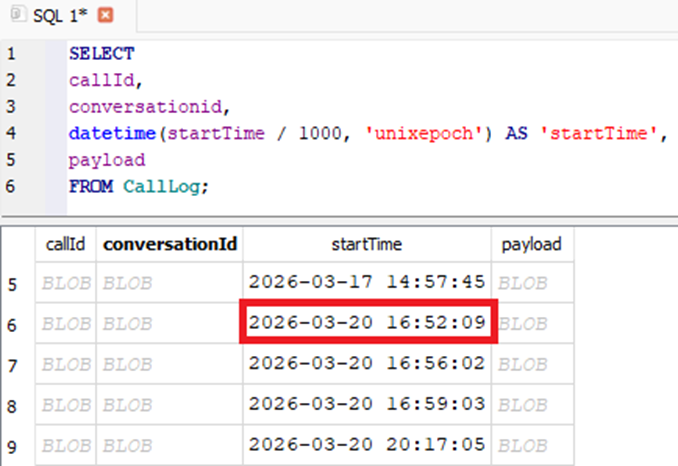
startTime from CallLog.db

creation_timestamp from Arroyo.db (conversation_message)
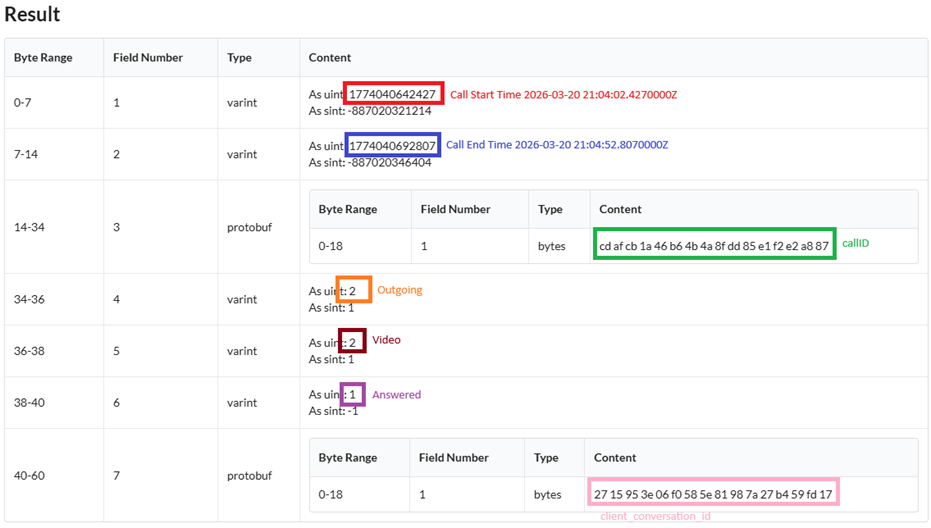
The protobuf data from the “payload” column provides a lot of good information about the call. This includes start time, end time, callID, outgoing/incoming call, voice/video call, answered/unanswered call, and the client_conversation_id.
Every call has three sets of bytes that are always in the following order:
Bytes 34-36 – Incoming Call (1) or Outgoing Call (2)
Bytes 36-38 – Voice/Audio Call (1) or Video Call (2)
Bytes 38-40 – Answered Call (1) or Unanswered Call (2)

To show the difference in the call end time from CallLog.db and the creation_timestamp from arroyo.db (conversation_message), below are the times converted from epoch to UTC.

Call end time from payload in CallLog.db
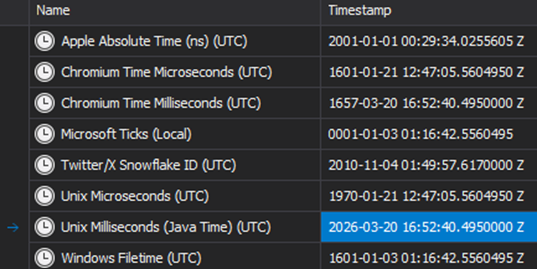
creation_timestamp from arroyo.db (conversation_message)
This shows that if the conversation_message creation_timestamp is interpreted as the “time of a call”, it would not be accurate.
Here are some other examples of calls I made during testing and how they appear in the data:
Incoming, answered, voice call from Samsung at 03-20-26 16:55 (UTC)
During testing, this call was intentionally not answered until 2026-03-20 16:56 (UTC). This shows that the startTime is the time the call is actually answered (or not answered), not necessarily the time the call is placed.

Incoming, answered, video call from Samsung at 2026-03-20 21:00 (UTC)
This call was not answered until 2026-03-20 21:01 (UTC).

Outgoing, answered, video call from Samsung device at 03-20-2026 21:03 (UTC)
For declined calls, the startTime will reflect the actual call time while the end call time will reflect the “declined” time. Examples:
Incoming, unanswered (Declined), voice call from Samsung at 2026-03-20 16:17 (UTC)

The creation_timestamp in arroyo.db (conversation_message) is still milliseconds after the “declined time.”

Outgoing, declined, video call to Samsung at 2026-03-20 16:24

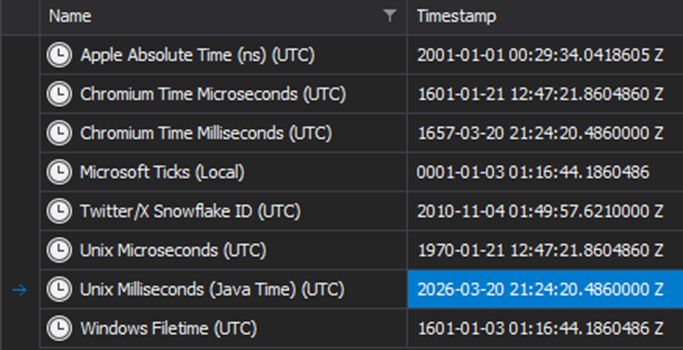
creation_timestamp from arroyo.db (conversation_message)
For calls that were simply unanswered, but not declined, the start and end times will be the same and they will be for the time the call was ended, not initiated. The call’s initiated time would be one minute prior to the startTime as Snapchat allows the call to “ring” for one minute before automatically hanging up.
The following is for an incoming, voice call, that was never answered or declined at 2026-03-17 14:50.

Arroyo.db provides additional information about a conversation to include an easier way to identify chat participants. The feed_entry table provides the following:
client_conversation_id – same as in other tables
conversation_title – Name of the conversation/group (if there is one)
participants – provides a list of participant user_ids
streak_expiration_timestamp_ms – epoch date/time a “streak” will end
The key_values table in arroyo.db provides the LAST_LOGIN_TIMESTAMP_KEY with a epoch time. That value is based on the time the application was actually last logged into, not just the last time the application was opened.
Primary.docobjects
Another useful database is primary.docobjects which can be located at [GUID]\Documents\user_scoped\[UniqueID]\DocObjects.
The “Snapchatter” table in this database contains the userId and in BLOB data it identifies the username, display name, and user ID.

Snapchatter table

Display Name, Username, User ID
The display name by default is whatever the account owner sets it as. A user can edit their friends’ display names on their end however, and this is where that information is stored.

Default Display Name

Edited Display Name
The snachatters_displaymetadata also stores the display name in a similar format.

The userinfo_coreuserdata contains information about the account owner. There are many rows that do not appear to contain relevant data. The important data also appears to be in order from lowest “id.” The id’s however are not in numerical order.

If the data is sorted by “id” however, one can go down the “p” column an identify useful information.

userinfo_coreuserdata “id 1” showing the username of the account

userinfo_coreuserdata “id 2” showing the display name of the account

userinfo_coreuserdata “id 3” showing the birthday of the account holder (YYY-MM-DD)

userinfo_coreuserdata “id 4” showing the email of the account



Comments